Home > Products > WiFi LED Bulb CCTV
WiFi LED Bulb CCTV


WiFi LED Bulb CCTV
TOV-147S
This is an innovative design and being attended. The idea is very simple to use and can be used worldwide, just insert a Micro-SD card and screw-in like a bulb,
turn on power, it will be auto recording.
Using this device, there is no drilling holes and no cabling, just using existing bulb holder. It is no need technical background,
you know how to replace a normal bulb, then you know how to install it. Besides, you can use your mobile phones or computers remotely access it via internet,
watching and hearing what is happening at there. It can be broadly used in any environments and setup by your own like home, office, factory, shopping mall,
restaurant and so on.
- TOVNET Cam is not a simple light fixture. It’s an IoT CCTV that can serve as an LED light, and a CCTV with PC and smartphone connection by simply being plugged into a light bulb socket.
- The LED light can be turned on and off separately from the camera’s power By using the remote controller that comes
with the device, or the ON/OFF function in the smartphone’s app, the lighting can be operated separately from the CCTV.
*Turning off the light will not affect the operation of the camera.

- TOVNET Cam offers the functions of conventional CCTV. You can check out the footage and audio in real-time,
and you can also store the footage on an SD card.
*Using a 32GB SD card will allow the storage of up to 5 days worth of 24-hour long video footage. (Up to 32GB SD cards may be used) - Use the sensor light function with the motion detector. Using the sensor light function of the TOVNET Cam APP will allow the LED light to turn ON when any movement is detected and to automatically turn off when no movement is detected. Also, you may also change the setting to have the CCTV operate only when there is some movement detected, and use the device as a sensor light and also as a CCTV monitoring for your front door.
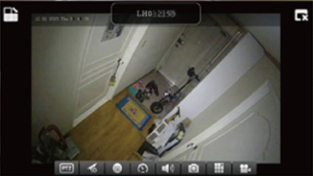
Normal footage
Infrared footage
- Infrared footage for nighttime. The sensor will detect its surrounding environment and the device will automatically shift to infrared mode in dark places or at night time.

-
TOVNET Co., Ltd
#312, New Knowledge Industrial Center, 484, Tongil-ro, Seodaemun-gu, Seoul
E-mail. info@tovnet.co.kr Tel. 02-3216-3983 Fax. 02-3216-3983 copyright© 2017 TOVNET Co., Ltd. All Rights Reserved. 